by super | Nov 4, 2025 | Elpro Technologies, Elpro Technologies Post
Seventy percent. That is how much warehouses typically spend on labor. I have seen companies crippled by these expenses. Antiquated, paper based systems simply cannot cut it anymore. I have seen a better way. I am talking about industrial tablet warehouse management. With specialized warehouse management software, these devices are built to endure the warehouse environment. Therefore, choosing the right industrial tablet is a make or break decision.
Why Invest in Industrial Tablets for Warehouse Management?
Why switch to industrial tablets? I have seen the advantages firsthand:
- Increased Efficiency: Instant information access and smooth communication cut errors and accelerate workflows.
- Improved Accuracy: Barcode and RFID scanning eliminate manual data entry errors ensuring accurate inventory tracking.
- Enhanced Productivity: Employees quickly access data and complete tasks boosting overall productivity.
- Reduced Costs: Processes are simplified and inventory control is better leading to significant cost savings.
- Data Driven Decisions: Real time data gives important insights for optimizing warehouse performance.
Businesses often see a dramatic turnaround with ruggedized tablets designed for harsh industrial environments. I have seen it address many of the common pain points associated with traditional warehouse management.
Key Features for Effective Industrial Tablet Warehouse Management
Now that you understand the benefits, let us check out the essential features that will maximize your warehouse performance:
1. Rugged and Durable Design
Durability is absolutely necessary. A standard consumer tablet will not survive long in a warehouse environment. Hazards like dust impacts and temperature fluctuations are common. Look for tablets that meet military grade standards (MIL STD 810G or later) for drop shock and vibration resistance. Also, Ingress Protection (IP) ratings are important. An IP65 rating or higher guarantees protection against dust and liquids.
I recall a client who initially went with consumer grade tablets. Within a month, half of them had failed. Investing in rugged tablets pays off through reduced downtime and fewer replacement costs.
2. Barcode and RFID Scanning Capabilities
Effective inventory management depends on reliable data. Barcode scanners and RFID readers are important for identifying and tracking items. Choose tablets that support a wide range of barcode types and RFID frequencies. Also, think about the scan range and speed. A high performance scanner will significantly improve productivity and inventory management.
3. Long Lasting Battery Life
A tablet with a dead battery is useless. Go for a device that offers at least eight hours of battery life. Hot swappable batteries allow workers to replace batteries without interrupting operations. External chargers ensure spare batteries are always ready.
4. High Visibility Display
Bright warehouses can make it hard to read a standard tablet screen. Look for a tablet with a high brightness display measured in nits. Screens designed for outdoor viewing are particularly valuable. Screen size and resolution are also important factors. A larger higher resolution screen makes it easier to view data and use applications.
5. Reliable Wireless Connectivity
Smooth wireless connections enable instant data transfer and communication. Ensure that the tablets support Wi Fi Bluetooth and cellular connections (4G LTE or 5G). The tablet should have a strong Wi Fi antenna and support current Wi Fi standards. Cellular connectivity gives a backup if Wi Fi is unavailable.
6. Compatible Operating System and Software
The operating system (OS) is the foundation for the tablet’s software. Android and Windows are common choices for industrial tablets. Pick an OS that integrates smoothly with your existing warehouse management system (WMS) and other applications. Also, think about software updates and OS support. Windows tablets integrate well with Windows infrastructure but they tend to be more expensive. Android offers flexibility and a wide range of apps.
7. Robust Data Protection
Protecting sensitive data is absolutely necessary. Look for tablets with strong security features such as password protection encryption and remote wipe capabilities. Biometric authentication (fingerprint or face recognition) adds an extra layer of security. Mobile Device Management (MDM) software enables remote tablet control and security management.
8. User Friendly Design
Workers will be using these tablets for extended periods so ease of use is important. Choose a tablet that is lightweight comfortable and easy to grip with one hand. Hand straps improve grip and reduce fatigue. Buttons and ports should be easily accessible.
9. Useful Accessories
Accessories can expand the functionality of industrial tablets. Common accessories include:
- Docking stations: For charging the tablet and connecting peripherals.
- Vehicle mounts: For use in forklifts and other vehicles.
- Hand and shoulder straps: For improved comfort and portability.
- Screen protectors: To protect against scratches and damage.
- Extended batteries: For longer operating times.
10. Dependable Vendor Support and Maintenance
Select a vendor that offers comprehensive support and maintenance including technical support repair services and software updates. On site support and rapid response times are important. A reliable support system minimizes downtime and keeps tablets running smoothly.
Real World Applications of Warehouse Tablets
To show the impact of warehouse tablets, check out these examples:
- Distribution Center: Deployed industrial tablets with barcode scanners to track shipments reducing data entry errors by 90% and improving shipping accuracy by 25%.
- Food Processing Plant: Utilized rugged tablets with RFID readers to track inventory eliminating stockouts and cutting waste by 15%.
- Retail Chain: Equipped warehouse staff with industrial tablets for picking and packing orders reducing fulfillment times by 20% and boosting customer satisfaction.
Pre Implementation Checklist
Implementing industrial tablets involves more than just purchasing and deploying them. Planning is important. Think about these points:
- Define Your Needs: What specific problems will the tablets solve? Which features are most important for your operations?
- Select the Right Tablet: Choose a tablet that aligns with your requirements and budget.
- Develop a Deployment Strategy: How will you distribute the tablets to your staff? What training will be necessary?
- Integrate with Existing Systems: Ensure smooth integration with your WMS and other relevant applications.
- Provide Ongoing Support: Offer continuous support and training to maximize user adoption and effectiveness.
Future Trends in Logistics Tablets for Warehouse Management
The future of logistics tablets looks good. As technology changes industrial tablets will become even more powerful versatile and valuable for warehouse operations. Expect advancements in these areas:
- Artificial Intelligence (AI): AI applications will give real time insights and automate tasks.
- Augmented Reality (AR): AR applications will overlay digital information onto the physical world giving workers contextual instructions.
- 5G Connectivity: 5G will enable faster and more reliable wireless connections.
- Improved Battery Technology: New battery technologies will extend battery life significantly.
- Enhanced Durability: Tablets will become even more resistant to damage and harsh environmental conditions.
Warehouses are becoming increasingly automated and data driven. Industrial tablets will be important in this transformation empowering workers to be more productive and efficient. Warehouse management software will also become more integrated with these devices.
Selecting the right industrial tablet for warehouse management is important with a direct impact on your bottom line. By thinking about the features discussed above you can choose a device that meets your specific needs and helps you achieve your operational goals. From durability and battery performance to barcode scanning and wireless connectivity each feature contributes to improved warehouse efficiency and productivity. As warehouses continue to change industrial tablets will remain important tools for effective inventory and workflow management.
by super | Nov 4, 2025 | Elpro Technologies, Elpro Technologies Post
Did you know a business switching to rugged industrial tablets can slash equipment downtime by as much as 70% within a single year? That is a real game changer. Having personally waded through the maze of tablet options, I have learned the most important decision centers on one question: should you choose an industrial tablet or a consumer model? This choice has serious implications for device lifespan and your company’s expenses. Let us get into it.
I have watched companies wrestle with this decision up close. Picture this: a construction company provides its field crew with consumer tablets and soon faces a barrage of cracked screens and batteries that will not hold a charge. Those devices could not withstand the rigors of the job site. They needed a solution built for tough conditions. This story perfectly illustrates the dramatic differences between these two tablet categories. I will highlight the key differences to assist you in identifying the ideal device for your business.
Industrial Tablets: Engineered for Endurance
Industrial tablets are purpose built for challenging conditions and specialized business applications. They are engineered to withstand extreme temperatures, drops, vibration, dust and water. Think of them as dependable workhorses in the tablet space.
These tablets frequently include specialized tools such as barcode scanners, RFID readers and vehicle docking options. They emphasize unwavering dependability and long service lives, instead of fleeting trends and user interfaces designed for casual users. A consumer tablet might stream videos, but an industrial tablet manages warehouse inventory or gathers critical data on a chaotic construction site.
Consumer Tablets: Intended for Daily Use
Consumer tablets prioritize user experience, entertainment and affordability for daily use. They are outstanding for browsing the internet, watching videos and playing games. Their design emphasizes lightweight portability and ease of use.
These tablets commonly incorporate less durable materials and are not built to withstand rough handling. They might work for some business tasks, but they often lack specialized features and the ruggedness required for demanding situations. The lower initial cost can be appealing, but it can be a costly mistake, as I will discuss.
Core Differences: Industrial Tablets vs Consumer Tablets
Let us concentrate on the most vital differences between industrial tablets and consumer tablets.
1. Ruggedness: Designed to Endure
Industrial tablets excel in ruggedness. They are built to endure harsh conditions. Many meet military grade standards (MIL STD 810G or similar) for resistance to shock, drops and vibration. IP (Ingress Protection) ratings indicate their defenses against dust and moisture.
I once threw an industrial tablet from a forklift. It struck the concrete and continued working. Try that with a consumer tablet; it will shatter instantly.
Consumer tablets are fragile, typically featuring glass screens and plastic or aluminum bodies. They are not designed to be dropped or exposed to extreme conditions. Even a minor bump or spill can spell disaster.
2. Performance: Reliable and Consistent
Industrial tablets are engineered for reliable and consistent performance over long periods. They utilize industrial grade components, which are more resistant to failure. Enhanced thermal management prevents overheating in challenging environments.
I have found that industrial tablets generally outlast consumer models. They are built for years of service, even under demanding conditions, leading to lower total ownership costs.
Consumer tablets emphasize speed and quick responsiveness, boasting powerful processors and ample RAM. A long service life is not always a priority. Overheating and component failure are possible, especially in demanding applications.
3. Features: Specialized Tools
Industrial tablets frequently include specialized features tailored to specific business needs. Take a look at these:
- Barcode scanners
- RFID readers
- NFC (Near Field Communication)
- GPS
- Vehicle docking options
- Hot swappable batteries
Software and security features are often customizable, enabling businesses to fine tune the tablet to their exact requirements.
Consumer tablets are designed for general use. A standard feature set includes a camera, Wi Fi and Bluetooth. Specialized tools needed for demanding business applications might not be included.
4. Operating System: Tailored Options
Industrial tablets often use specialized operating systems or customized Android or Windows versions. Businesses can optimize the tablet for their specific applications and security protocols.
I worked with a logistics firm that needed real time shipment tracking. I customized the operating system on their industrial tablets to automatically upload location data and shipment status. This eliminated hours of manual data entry and greatly improved tracking accuracy.
Consumer tablets typically run standard Android or iOS versions. These operating systems are user friendly and offer a wide range of apps, but they are usually less customizable and secure than industrial tablet operating systems.
5. Cost: A Long View
Industrial tablets have a higher initial price, reflecting their rugged construction, specialized features and industrial grade components. The total cost of ownership can decrease thanks to longer lifecycles and reduced downtime.
Consumer tablets offer a lower initial cost, which is attractive to businesses watching their spending. Damage or failure might require more frequent replacements. Additional accessories or software might also be needed to handle specific business tasks.
Industrial Tablet Uses: Where They Excel
Industrial tablets are well suited for businesses that need a dependable, rugged device for harsh environments. Consider these common uses:
- Field service: Technicians access work orders, diagnose problems and gather data.
- Warehousing: Workers manage inventory, track shipments and pick orders.
- Construction: Supervisors monitor progress, manage safety and communicate with workers.
- Transportation: Drivers use tablets for navigation, electronic logging and delivery confirmation.
- Healthcare: Nurses and doctors access patient records, administer medications and gather data.
One of my clients, a major agricultural enterprise, uses industrial tablets to monitor crop yields and manage irrigation. The tablets withstand extreme heat, dust and moisture, maintaining reliable operation. This has improved efficiency and reduced water consumption.
Consumer Tablet Uses: When They Fit
Consumer tablets can be a fit for some business tasks, especially in office environments or for tasks that do not demand significant ruggedness. Common examples include:
- Sales presentations: Salespeople present products and services.
- Meetings and collaboration: Employees take notes, share documents and participate in video conferences.
- Customer service: Agents access customer information and resolve issues.
- Light data entry: Employees enter data into spreadsheets or databases.
A small retailer I know uses consumer tablets as point of sale systems. They look great, are easy for employees to learn and are inexpensive to replace if damaged.
Making the Choice: Key Questions
The choice between industrial tablets versus consumer tablets depends on your specific business needs. Ask yourself these questions:
- What environment? Will the tablet be exposed to extreme temperatures, dust, water or other harsh conditions?
- What tasks? Will it handle data collection, inventory management or other demanding applications?
- What features? Do you need a barcode scanner, RFID reader or other specialized tools?
- What budget? How much are you willing to spend on tablets?
- What long term costs? Think about replacement costs, repairs and downtime when making your decision.
Other Important Points
Consider these additional factors:
- Security: Industrial tablets often provide enhanced security features, essential for protecting sensitive business data.
- Manageability: Prioritize tablets that work well with your existing IT infrastructure and offer remote management capabilities.
- Accessories: Ensure that accessories like docking stations, protective cases and external batteries are readily available.
- Warranty and Support: Carefully examine the warranty terms and the level of technical support offered by the manufacturer.
The decision between industrial and consumer tablets is a strategic one that impacts your business’s efficiency, productivity and bottom line. Consumer tablets might seem less expensive at first, but industrial tablets offer superior durability, reliability and specialized features, possibly saving you money in the end. Assess your needs carefully, make an informed decision and invest in the right tool. I have seen the initial cost of an industrial tablet quickly pay for itself through reduced downtime and increased productivity, especially in challenging work environments.
by super | Nov 4, 2025 | Elpro Technologies, Elpro Technologies Post
Imagine field service technicians wasting nearly a third of their time struggling with broken equipment. That is time they could be using to help customers and generate income. From my own experience, rugged tablets for field service are changing how things work, improving accuracy, boosting how much gets done and making teamwork easy, even in tough spots.
But what does “rugged” really mean when we talk about tablets? It is not just a marketing term. It means the device is carefully made to handle conditions that would destroy a regular tablet. I am talking about surviving repeated drops, hard hits, very hot and cold temperatures, splashes of water, dust storms and constant shaking. These situations are not just possibilities; they happen every day to technicians in construction, utilities, transportation and many other demanding industries. These tablets are built to last.
Understanding Rugged Tablet Durability
Ingress Protection (IP) ratings are very important. For example, an IP65 rating means the device is completely protected from dust and can handle water jets. Higher ratings, like IP68, mean it is completely protected from dust and can even be underwater for a while. I consider this the minimum for something to be truly rugged.
I remember once when a technician accidentally dropped their rugged tablet for field service into a muddy puddle during an inspection. They just rinsed it off and kept working. You cannot do that with a normal tablet.
Key Benefits of Rugged Tablets in Field Service
The benefits of giving field service teams rugged tablets for field service go beyond just being tough. Output, data quality and communication are all improved greatly:
- Increased Uptime: Less equipment downtime means more income. Technicians stay connected and productive, no matter where they are. Companies I have worked with have seen a 20 to 30% decrease in device downtime after using rugged tablets.
- Improved Data Accuracy: Paper systems make mistakes, lose paperwork and have hard to read handwriting. Rugged tablets allow data to be captured in real time, which fixes these problems. Built in cameras, barcode scanners and RFID readers improve data accuracy even more.
- Enhanced Communication: Technicians have instant access to work orders, schematics and technical documents, so they have the information they need. Real time communication with dispatchers and experts at the office speeds up problem solving.
- Greater Efficiency: By combining all important functions into one device, rugged tablets eliminate the need for technicians to carry many tools or use old paper systems. This leads to faster work and greater output.
- Better Customer Service: Technicians can give more informed and personalized support with immediate access to customer profiles, service history and real time information. This improves customer satisfaction and strengthens long term relationships.
I remember a technician who quickly solved a customer issue because they had immediate access to the equipment’s service history on their rugged tablet for field service. The customer was very impressed.
Real World Applications of Rugged Tablets
Rugged tablets in field service can be used in many ways, and that is growing all the time. Here are some examples I have seen:
- Utilities: Inspecting power lines, gas pipes and water lines in remote areas, often in bad weather. Rugged tablets give access to GIS data, schematics and communication platforms, helping technicians quickly diagnose and fix issues.
- Construction: Managing blueprints, tracking materials and documenting job site progress. Rugged tablets resist dust, vibration and temperature extremes, ensuring they work consistently in harsh conditions.
- Transportation: Inspecting vehicles, managing logistics and tracking shipments. Rugged tablets provide up to the minute data on vehicle performance, location and cargo, allowing transportation companies to improve their operations.
- Manufacturing: Maintaining equipment, tracking inventory and ensuring quality control in factories. Rugged tablets resist chemicals, extreme heat, extreme cold and vibration, ensuring they perform reliably in industrial settings.
- Public Safety: Law enforcement, fire departments and emergency medical personnel rely on rugged tablets for important communications, data access and navigation. These devices must handle harsh conditions and work reliably during emergencies.
I once worked with a utility company that greatly improved its response times by giving its field crews rugged tablets for field service. The tablets allowed them to quickly access information and communicate with the main office, which reduced delays.
Choosing the Right Rugged Tablet
Not all rugged tablets are the same. When picking a device for your field service team, remember these features:
- Durability: Pick a tablet with a high IP rating, MIL STD 810G certification (or higher) and a rugged frame. These certifications mean the device has been tested to handle drops, impacts, vibration, temperature extremes and other environmental dangers. I suggest checking independent tests for real world durability assessments.
- Display: Pick a bright display that can be read in sunlight with a wide viewing angle. This makes sure technicians can easily see the screen, even in direct sunlight. A touchscreen that works with gloves is also important for field service work.
- Battery Life: Long lasting battery life is important for technicians who spend long hours in the field. Look for a tablet with a battery that lasts a whole shift or think about models with batteries that can be swapped while the device is running.
- Connectivity: Reliable connectivity is needed for communication and data access. Make sure the tablet supports Wi Fi, Bluetooth and cellular connectivity (4G LTE or 5G).
- Processing Power: Select a tablet with enough processing power to run the applications your technicians need. A faster processor improves performance and responsiveness, especially when running complex software.
- Operating System: Android and Windows are the most common operating systems for rugged tablets. Choose the operating system that is best for your applications and IT setup.
- Accessories: Think about available accessories for the tablet, such as docking stations, vehicle mounts, barcode readers and RFID scanners. These accessories improve how the device works and how easy it is to use.
I have learned that investing in a high quality display and a long lasting battery are two of the most important things to consider when selecting a rugged tablet.
The Total Cost of Ownership
Rugged tablets usually cost more at first than regular tablets, but you must think about the total cost of ownership (TCO). Things to consider include:
- Reduced Downtime: As I said before, rugged tablets reduce downtime because of equipment failure. This leads to lower repair costs and higher output.
- Extended Lifespan: Rugged tablets are designed to last longer than regular tablets, so you do not need to replace them as often.
- Improved Productivity: By improving workflows and giving technicians the tools they need, rugged tablets greatly improve output.
- Lower Support Costs: Rugged tablets are less likely to need technical support, which lowers IT costs.
I have found that when you consider these costs, rugged tablets often have a lower TCO than regular tablets in field service situations. A detailed ROI analysis will show the benefits.
The Future of Rugged Tablets in Field Service
The use of rugged tablets in field service will continue to grow. As technology gets better, expect even more advanced features and capabilities, such as:
- Augmented Reality (AR): AR applications allow technicians to overlay digital information onto the real world, giving step by step instructions, remote support and better diagnostics.
- Artificial Intelligence (AI): AI tools analyze data from sensors and other sources to predict equipment failures, improve maintenance schedules and improve decision making.
- 5G Connectivity: Faster and more reliable 5G connectivity allows technicians to access real time information, work with remote specialists and use advanced applications like video conferencing and remote diagnostics.
- Improved Security: Rugged tablets include advanced security measures to protect sensitive data and prevent unauthorized access.
I am particularly excited about augmented reality changing field service. I see technicians using AR to diagnose and repair equipment with remote help from experts.
These improvements further improve the output, efficiency and safety of field service.
Giving your field service team rugged tablets for field service is an investment that can give you big returns. By improving uptime, data quality, communication and efficiency, these devices help you lower expenses, increase income and improve customer satisfaction. I believe rugged tablets are not just a nice thing to have but something needed for any field service organization that wants to stay competitive. Think about your specific needs, check out the available options and choose the devices that are best for your team. The right rugged tablets can change your field service, helping your mobile workforce achieve more success.
I have seen that the most successful field service organizations are the ones that use technology and give their teams the right tools. Rugged tablets are a key part of this.
by super | Nov 4, 2025 | Elpro Technologies, Elpro Technologies Post
Did you know that standard tablets have a life expectancy of only about two years in harsh industrial environments, while specialized industrial tablets can last five years or more? That is a significant difference. I have seen it firsthand on factory floors near Gurgaon, where grime is a constant battle, and on construction sites fighting the fierce Himalayan winds. A regular tablet simply will not survive. Industrial tablets, however, are built for these conditions. As someone who works directly with numerous Indian businesses, I can tell you that selecting the right industrial tablet manufacturer India is crucial, and that the correct tablet can completely change how a business operates, greatly increasing output and efficiency.
Why Industrial Tablets are a Must
Industrial tablets are not just regular devices made tougher. They are specifically designed and built to work reliably in difficult situations. Let me tell you about some key advantages:
- Durability: They resist drops, shocks, vibration, water, dust and extreme temperatures.
- Reliability: Industrial grade parts ensure consistent performance and a longer life.
- Connectivity: Expect dependable wireless connections using Wi Fi, Bluetooth and cellular for constant uptime.
- Security: Improved security features keep sensitive data safe.
- Longevity: They last longer than standard tablets, so you do not have to replace them as often.
It is important to choose a tablet that is right for what you need it to do. The needs of a tablet used for field service are different from one used to control manufacturing processes.
Understanding What Makes a Tablet Rugged: IP Ratings and MIL STD 810G
How tough is tough enough? That is what you must ask. Two standards can help you understand how well a tablet will hold up under harsh conditions:
- IP (Ingress Protection) Rating: This tells you how well the tablet resists solids, like dust, and liquids, like water. For example, a tablet with an IP67 rating is dustproof and can be underwater for 30 minutes at a depth of one meter.
- MIL STD 810G: The US military uses this to test equipment against environmental stresses, like drops, shocks, vibration, temperature extremes, humidity and altitude.
Choose tablets with IP and MIL STD 810G ratings that match the challenges of your work environment. I have seen companies save money by spending a little more upfront for a stronger tablet, which avoids costly repairs and downtime later.
Key Features for Industrial Tablets
Beyond just being tough, other features are important for industrial uses:
- Display: If you use the tablet outdoors, you will want a bright screen that you can easily read in sunlight. Also think about screen size, resolution and features like optical bonding for better viewing.
- Processor and Memory: Make sure the processor and memory are good enough to smoothly run your applications. Also, check if the operating system is compatible.
- Battery Life: When you are in the field, long battery life is essential. Some tablets have hot swappable batteries, so you can keep working without interruption. I once worked with a mining company where technicians were losing a lot of time each day because of tablet battery failures. Hot swap batteries solved this problem.
- Connectivity: The tablet should have the connections you need: Wi Fi, Bluetooth, cellular (4G/5G) and GPS.
- Operating System: Industrial tablets typically use Windows or Android. Windows works with many older applications, while Android has a more modern and easy to use interface.
- Data Capture: Built in barcode scanners, RFID readers and cameras make data collection easier.
- Ports and Expansion: Check for ports like USB, Ethernet and serial for connecting to other devices. Expansion slots let you add more storage or specialized modules.
How Industrial Tablets are Used in India
Across India, industrial tablets see widespread use in many industries. I often see them in:
- Manufacturing: Managing factory floors, tracking inventory, ensuring quality control, monitoring machinery and performing maintenance.
- Logistics and Transportation: Managing warehouses, tracking fleets, monitoring deliveries and maintaining electronic logs.
- Field Service: Inspecting assets, reading meters, managing work orders and conducting remote diagnostics.
- Construction: Surveying sites, using Building Information Modeling (BIM), managing projects and performing safety inspections.
- Oil and Gas: Inspecting pipelines, monitoring wells and maintaining equipment.
- Healthcare: Mobile point of care, electronic health records (EHR) and medication administration.
- Retail: Point of sale (POS) systems, inventory management and mobile ordering.
Finding the Right Industrial Tablet Manufacturer in India
Choosing the right industrial tablet manufacturer India is vital for getting a product that is reliable and high quality. Consider these things:
- Experience: Look for a manufacturer that has a history in the industrial tablet market.
- Product Portfolio: They should have a range of tablets for different uses.
- Customization: Some manufacturers will customize tablets to meet your specific needs.
- Support: Make sure they offer full support, including warranty, repair services and technical help. One of my clients chose a manufacturer based only on price and soon regretted it. They then switched to a more reputable company.
- Certifications: Look for certifications like ISO 9001 to confirm quality standards.
- Local Presence: A manufacturer in India can provide faster and better support.
Top Industrial Tablet Manufacturers in India
The Indian market for industrial tablets has both global and local brands. Here are some names to know:
- [Insert Brand Name 1]: [Brief Description]
- [Insert Brand Name 2]: [Brief Description]
- [Insert Brand Name 3]: [Brief Description]
- [Insert Brand Name 4]: [Brief Description]
- [Insert Brand Name 5]: [Brief Description]
Note: Brand recommendations may change. Please replace the bracketed placeholders above with actual brand names and brief descriptions.
Cost Compared to Value: Understanding What You are Paying For
Industrial tablets cost more than regular tablets because they are more durable and have special features. Think about the total cost, including:
- Purchase Price: The initial cost.
- Maintenance: The cost to repair or replace tablets that get damaged.
- Downtime: The money lost when tablets are not working.
- Software: The cost to install and license software.
- Training: The cost to train employees how to use the tablet.
Spending a little more on a stronger tablet often saves money in the long run because you will have fewer repairs and less downtime. I always tell my clients to think about the long term effects of their investment.
What is Next for Industrial Tablets in India?
The industrial tablet market in India will keep growing as more industries adopt automation and digital technologies. Watch for these trends:
- 5G Connectivity: Faster and more reliable connections will allow new uses, such as real time video streaming and remote control.
- Artificial Intelligence (AI): AI will improve data analysis, predictive maintenance and decision making.
- Augmented Reality (AR): AR will give workers real time information and guidance, increasing productivity and safety.
- Increased Ruggedness: Tablets will become even stronger and more resistant to tough conditions.
- Customization: Manufacturers will offer more ways to customize tablets to meet specific customer needs.
Success Stories: How Industrial Tablets Have Made a Real Difference
Here are a few examples of how industrial tablets have helped Indian companies make big improvements:
- Manufacturing: A leading automaker in Pune used industrial tablets on its factory floor to monitor production in real time, which cut downtime by 15% and increased productivity by 10%.
- Logistics: A logistics firm in Mumbai gave its drivers rugged tablets for route planning and electronic proof of delivery, which reduced delivery times by 20% and improved customer satisfaction.
- Field Service: An energy company in Gujarat provided its field technicians with industrial tablets for inspecting and maintaining equipment, which improved data accuracy and reduced inspection times by 25%.
Best Practices for Using Industrial Tablets
To get the most out of industrial tablets, you need a good plan for how to use them. I suggest these best practices:
- Define Your Needs: Know what you need and choose tablets that can do those things.
- Choose Appropriate Software: Select software that works with industrial tablets and fits your current workflows.
- Provide Comprehensive Training: Teach your employees how to use the tablets and software well.
- Implement Device Management: Use a Mobile Device Management (MDM) system to manage and secure your tablets.
- Offer Ongoing Support: Provide support to help with any problems or questions that come up.
Conclusion
Industrial tablets are powerful and can transform how businesses operate in India. If you choose the right tablet and use it well, your business can become more productive, efficient and safe. Keep up with the latest trends to get the most value from these devices. India needs efficient manufacturing to grow its economy, and investing in the right tools, like rugged tablets from a reliable industrial tablet manufacturer India, is important for making progress.
by super | Nov 4, 2025 | Elpro Technologies, Elpro Technologies Post
What is an Information Kiosk?
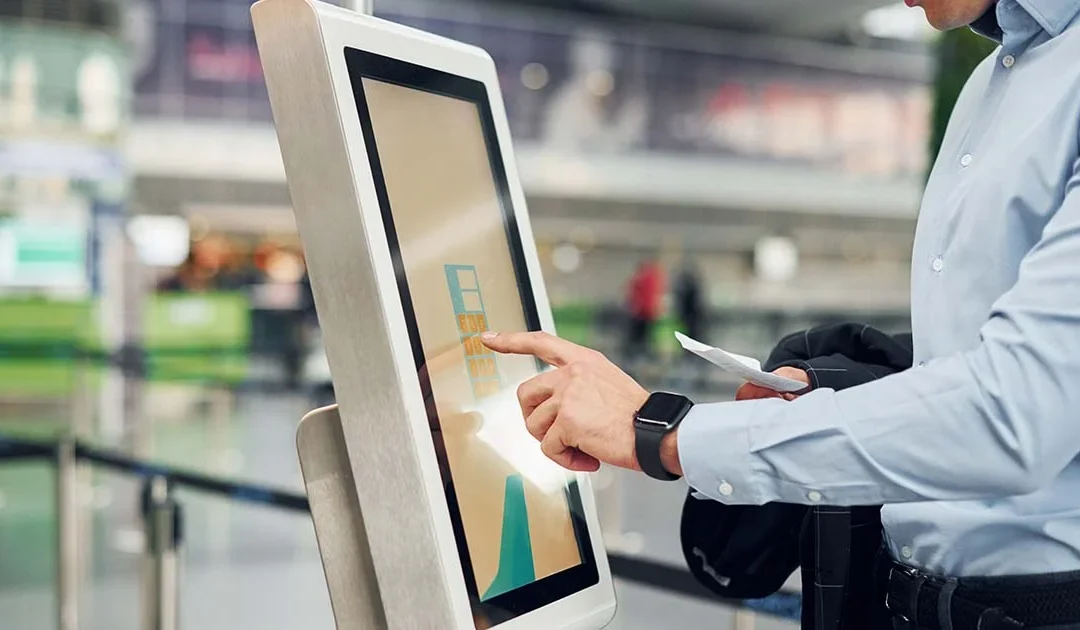
An Information Kiosk is a self-service terminal designed to provide users with information, directions, or services in a public or semi-public space. Unlike interactive kiosks focused on transactions (like ticketing or payments), Information kiosk are mainly informational, though many modern ones also allow basic interactions.
Common Uses
-
Wayfinding & Navigation: Malls, airports, hospitals, campuses
-
Public Information: Government offices, libraries, museums, exhibitions
-
Customer Assistance: Retail stores, shopping centers
-
Tourism: City guides, hotel info, attraction details
-
Event Management: Conferences, trade shows, exhibition details
- Elpro Technologies Bangalore stands as a trusted leader in Industrial PCs, Digital Signage, Touchscreen Kiosks, and advanced display systems. Over the years, the company has built a strong reputation for quality, reliability, and innovation, making it a preferred choice for businesses looking for robust industrial hardware solutions. With a customer-first approach, Elpro Technologies continues to serve clients across a wide spectrum of industries, providing products that deliver consistent performance and long-term value.
Beyond its headquarters in Bangalore, Elpro Technologies has expanded its delivery and support network to cover major cities across India. Whether your business is in Mumbai, Delhi, Chennai, Hyderabad, Pune, Kochi, Kolkata, or emerging industrial hubs,
Elpro Technologies ensures timely delivery, installation, and service support. This pan-India presence reflects the company’s commitment to making world-class industrial and digital solutions accessible to enterprises of all sizes and sectors.
Every product offered by Elpro Technologies is designed and manufactured with strict quality standards, ensuring durability and superior performance even in challenging industrial environments. From rugged industrial computers and single-board systems to custom kiosks, vertical digital standees, and floor displays, Elpro Technologies provides a complete range of solutions under one roof. This end-to-end capability allows customers to enjoy seamless integration, easier maintenance, and a single point of contact for all their hardware needs.
Contact : Elpro Technologies
📍 Address: #43, 2nd Cross Road, P&T Colony, Opposite BWSSB Office, R.T. Nagar, Bengaluru – 560032, Karnataka, India
📞 Mobile: +91-8892147021 / +91-8892147023
📧 Email: sales@elprotech.in | info@elprotech.in
🌐 Website: www.elprotech.in

by super | Nov 4, 2025 | Elpro Technologies, Elpro Technologies Post
What is an Embedded Computer?
An Embedded Computer is a specialized computing system built to perform dedicated functions within a larger device or system. Unlike general-purpose PCs, embedded computers are designed for specific tasks, often running continuously in industrial, consumer, or automotive environments.
- Elpro Technologies Bangalore stands as a trusted leader in Industrial PCs, Digital Signage, Touchscreen Kiosks, and advanced display systems. Over the years, the company has built a strong reputation for quality, reliability, and innovation, making it a preferred choice for businesses looking for robust industrial hardware solutions. With a customer-first approach, Elpro Technologies continues to serve clients across a wide spectrum of industries, providing products that deliver consistent performance and long-term value.Beyond its headquarters in Bangalore, Elpro Technologies has expanded its delivery and support network to cover major cities across India. Whether your business is in Mumbai, Delhi, Chennai, Hyderabad, Pune, Kochi, Kolkata, or emerging industrial hubs, Elpro Technologies ensures timely delivery, installation, and service support. This pan-India presence reflects the company’s commitment to making world-class industrial and digital solutions accessible to enterprises of all sizes and sectors.Every product offered by Elpro Technologies is designed and manufactured with strict quality standards, ensuring durability and superior performance even in challenging industrial environments. From rugged industrial computers and single-board systems to custom kiosks, vertical digital standees, and floor displays, Elpro Technologies provides a complete range of solutions under one roof. This end-to-end capability allows customers to enjoy seamless integration, easier maintenance, and a single point of contact for all their hardware needs.Contact : Elpro Technologies
📍 Address: #43, 2nd Cross Road, P&T Colony, Opposite BWSSB Office, R.T. Nagar, Bengaluru – 560032,Karnataka,India
📞 Mobile: +91-8892147021 / +91-8892147023
📧 Email: sales@elprotech.in | info@elprotech.in
🌐 Website: www.elprotech.in
