by super | Nov 3, 2025 | Elpro Technologies, Elpro Technologies Post
What Is a Self-Service Kiosk?
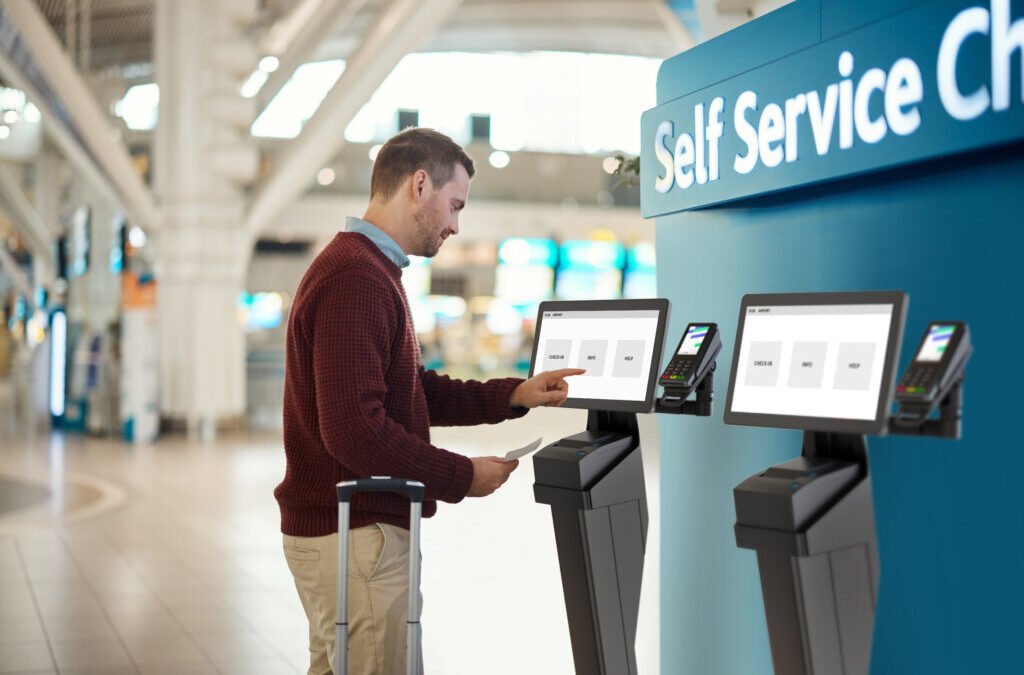
A self-service kiosk is an interactive computer terminal that allows users to perform specific tasks or access services without direct staff assistance. These kiosks typically feature:
-
A touchscreen interface
-
A computer system or tablet backend
-
Payment modules (card readers, cash acceptors, NFC)
-
Optional printers, scanners, and cameras
- Self service kiosks in retail India create a world where customers bypass queues, explore items easily and finish purchases at their speed. These terminals are a strategic move that produces great results for retailers.
- Elevating the Customer Experience
- One big plus of self service kiosks in retail India? They greatly improve shopping. People want speed and ease. Kiosks allow buyers to control their purchases and avoid long waits. I saw one customer high five a kiosk after breezing through a normally packed checkout line.
- Self service kiosks enhance shopping in several ways:
- Shorter Waits: Kiosks cut down wait times, especially when stores are packed. This lets shoppers buy what they want fast and easily.
- Fewer Mistakes on Orders: When customers enter their orders, kiosks reduce errors that staff might make. I remember a restaurant reducing wrong orders by 60% after installing kiosks.
- Customized Shopping: Kiosks provide recommendations and special offers based on what customers like and have bought before. It is like having a personal shopping assistant.
- Support for Many Languages: India has many languages. Kiosks overcome this issue by supporting multiple languages. This broadens the customer base.
- Elpro Technologies Bangalore stands as a trusted leader in Industrial PCs, Digital Signage, Touchscreen Kiosks, and advanced display systems. Over the years, the company has built a strong reputation for quality, reliability, and innovation, making it a preferred choice for businesses looking for robust industrial hardware solutions. With a customer-first approach, Elpro Technologies continues to serve clients across a wide spectrum of industries, providing products that deliver consistent performance and long-term value.
Beyond its headquarters in Bangalore, Elpro Technologies has expanded its delivery and support network to cover major cities across India. Whether your business is in Mumbai, Delhi, Chennai, Hyderabad, Pune, Kochi, Kolkata, or emerging industrial hubs, Elpro Technologies ensures timely delivery, installation, and service support. This pan-India presence reflects the company’s commitment to making world-class industrial and digital solutions accessible to enterprises of all sizes and sectors.
Every product offered by Elpro Technologies is designed and manufactured with strict quality standards, ensuring durability and superior performance even in challenging industrial environments. From rugged industrial computers and single-board systems to custom kiosks, vertical digital standees, and floor displays, Elpro Technologies provides a complete range of solutions under one roof. This end-to-end capability allows customers to enjoy seamless integration, easier maintenance, and a single point of contact for all their hardware needs.
Contact : Elpro Technologies
📍 Address: #43, 2nd Cross Road, P&T Colony, Opposite BWSSB Office, R.T. Nagar, Bengaluru – 560032,Karnataka,India
📞 Mobile: +91-8892147021 / +91-8892147023
📧 Email: sales@elprotech.in | info@elprotech.in
🌐 Website: www.elprotech.in
by super | Nov 2, 2025 | Uncategorized
Did you know that unplanned downtime can cost industrial manufacturers fortunes? I have witnessed firsthand how this drives companies to seek reliable control systems. In India there is a significant demand for solutions that not only optimize operations but also withstand harsh conditions in manufacturing plants, power grids and transportation networks. The Mini PC Industrial Control India market is rising to meet this need, offering compact but powerful alternatives to traditional industrial PCs, which are specifically designed for resilience and high performance in critical control applications. The small size, cost effectiveness and ruggedness are a few reasons these mini PCs are gaining popularity for industrial control in India.
Traditional industrial PCs are durable but consume a lot of space and energy. I remember situations where floor space limitations made bulky PCs completely impractical. Mini PC Industrial Control India solutions directly solve these issues.
- Compact Footprint: They easily integrate into existing setups, even in environments with limited space.
- Lean Energy Consumption: Lower power consumption reduces operational costs and minimizes environmental impact.
- Battle Hardened Design: They are engineered to withstand extreme temperatures, humidity, dust and vibration making them ideal for challenging industrial environments.
- Wallet Friendly: They are often a more economical solution than traditional industrial PCs without sacrificing performance.
These advantages make mini PCs an attractive option for companies modernizing their control systems. Let us look at specific applications that are benefiting from this technology.
Versatile Applications of Mini PC Industrial Control in India
Mini PCs are versatile and are increasingly being used across diverse industrial control applications in India. Consider these examples:
- Factory Automation: They coordinate robotic arms, conveyor belts and other automated machinery.
- Process Oversight: They monitor and regulate chemical processes, oil and gas pipelines and water purification facilities.
- Transportation Management: They enhance traffic flow, ensure railway signaling accuracy and optimize airport logistics.
- Power Network Guardianship: They monitor and control power generation, transmission and distribution infrastructure.
- Building Intelligence: They optimize HVAC systems, lighting and security protocols in commercial and industrial properties.
I once helped a manufacturing facility near Pune integrate mini PCs into their production line. These mini PCs managed robotic welding arms, which led to a significant increase in production speed and a reduction in welding defects. This is one example of how Mini PC Industrial Control India is transforming industries.
Reliability is critical when deploying mini PCs in industrial control systems. These systems often operate in harsh environments. Keep these critical factors in mind to ensure dependable operation.
Key Considerations for Reliable Mini PC Industrial Control
The mini PC must be built to withstand specific environmental challenges. This includes:
- Extended Operational Range: Functioning reliably in temperatures from -40°C to +70°C or higher.
- Fanless Design: Eliminating fan failure risk and preventing dust intrusion.
- Resilience to Shocks and Jolts: Enduring vibrations and impacts without performance degradation.
- Impenetrable Shell: Shielding internal components from dust, moisture and other contaminants.
Investing in a ruggedized mini PC saves money by minimizing downtime and maintenance.
Power Stability
A stable power supply is indispensable for consistent operation. It must tolerate voltage and frequency fluctuations and incorporate surge protection. I recommend mini PCs with a wide voltage input range (9 36V DC).
Uninterrupted Communication
Consistent connectivity is crucial for seamless communication. The mini PC must offer diverse communication ports, including Ethernet, serial, USB and wireless interfaces. Multiple Ethernet ports are especially beneficial for redundant network paths.
Operating System and Software Harmony
Careful selection of the operating system and software is essential. Real time operating systems (RTOS) are often used for their predictable performance. Linux based operating systems are also gaining popularity for their adaptability and open source nature.
Selecting the right mini PC for your industrial control application requires careful evaluation. I recommend these steps:
- Define Your Boundaries: Clearly delineate performance benchmarks, environmental considerations and connectivity requirements.
- Survey the Landscape: Scrutinize available mini PC models, paying close attention to specifications, features and certifications.
- Gauge Performance: Test the mini PC with your control application to verify performance expectations.
- Prioritize Support and Assurance: Select a vendor recognized for dependable technical support and a comprehensive warranty program.
- Balance Cost with Value: Prioritize finding a mini PC that provides excellent value, considering performance, reliability and features.
I advise clients to document their needs and use this to assess mini PC options. This helps identify a mini PC ideally suited to their application.
Automation in India is driving the integration of mini PCs into industrial control systems. Automation is becoming more significant as Indian industries enhance efficiency, reduce expenses and boost productivity. Mini PCs furnish a cost effective and dependable platform for implementing automation solutions, empowering businesses to optimize their operations and secure a competitive edge. The growing availability of affordable and capable mini PCs is democratizing access to automation for businesses of all sizes. What are some specific examples of automation using mini PCs?
Examples of Automation in India Using Mini PCs
- Precision Farming: Mini PCs manage automated irrigation systems, monitor soil conditions and oversee drone based crop inspection systems.
- Intelligent Factories: Mini PCs oversee robotic assembly lines, track equipment performance and manage inventory in real time.
- Smart Logistics: Mini PCs are deployed in automated warehouses, package sorting systems and delivery drones.
I anticipate that the trend toward automation will continue, further fueling demand for mini PCs in industrial control systems.
These case studies highlight the advantages of using mini PCs in industrial control systems.
Case Study 1: Smart Grid Oversight in Maharashtra
A power distribution provider in Maharashtra implemented mini PCs to monitor and manage its distribution network. These mini PCs were strategically positioned in substations, gathering data on voltage levels, current flow and power distribution. This data was transmitted to a central control center, where it underwent analysis to pinpoint potential issues and optimize grid performance. The company enhanced its power supply reliability and diminished energy losses through the utilization of mini PCs.
Case Study 2: Automated Production in Tamil Nadu
A textile manufacturer in Tamil Nadu integrated mini PCs into its production workflow to automate fabric cutting and sewing processes. The mini PCs precisely controlled robotic cutting machines and sewing machines, which led to increased production speed and reduced labor expenses. The adoption of mini PCs also improved the quality of finished goods by ensuring consistent cutting and sewing execution.
Case Study 3: Intelligent Transportation in Delhi
The Delhi Metro Rail Corporation (DMRC) relies on mini PCs to support its train control and signaling infrastructure. The mini PCs monitor train location and speed, manage the signaling network and control passenger information displays. The utilization of mini PCs guarantees the safe and efficient operation of the metro system, transporting millions of commuters daily.
These case studies underscore the broad spectrum of applications for mini PCs in industrial control systems and emphasize the substantial benefits they provide.
The outlook for Mini PC Industrial Control India appears exceptionally promising. I foresee these key trends further accelerating their adoption.
- Surging Performance: Mini PCs are gaining processing power, approaching the capabilities of traditional desktop PCs.
- Diminished Energy Footprint: Advancements in processor technology are yielding lower power consumption.
- Enhanced Connectivity: Mini PCs now provide a multitude of wireless connectivity options.
- Heightened Ruggedness: Mini PCs are becoming increasingly durable.
I am convinced that these trends will establish mini PCs as an increasingly compelling choice for businesses seeking to modernize their industrial control systems and embrace automation.
Mini PCs present numerous advantages for industrial control applications but I also acknowledge that certain challenges must be addressed to ensure successful implementation. These challenges include.
- Cybersecurity Fortification: Industrial control systems are encountering escalating cyberattacks. I must stress the necessity of implementing robust security protocols.
- Data Stewardship: Industrial control systems generate substantial volumes of data. You must formulate a data management strategy.
- Bridging the Skills Chasm: A scarcity of skilled professionals possessing the expertise to design, implement and maintain industrial control systems exists.
By proactively addressing these challenges, businesses can maximize the benefits derived from mini PCs within their industrial control systems.
Selecting the appropriate vendor to fulfill your mini PC requirements is paramount for successful implementation. I encourage my clients to consider these aspects when evaluating potential vendors.
- Proven Track Record: Opt for a vendor with a solid history of delivering mini PC solutions tailored for industrial control applications.
- Comprehensive Product Lineup: Select a vendor that provides a diverse selection of mini PC models to accommodate your unique needs.
- Responsive Technical Assistance: Ensure the vendor offers dependable technical support and a comprehensive warranty.
- Tailoring Capabilities: Seek out a vendor that offers customization options if you have specific requirements.
- Strategic Alliances: Favor vendors that have established partnerships with other technology companies.
I have discovered that establishing a partnership with a reputable vendor can substantially mitigate the likelihood of issues arising during the lifespan of your mini PC powered industrial control system.
Mini PC industrial control solutions are reshaping industrial operations, delivering a potent, dependable and economical alternative to conventional industrial PCs. As Indian industries persist in embracing automation, I anticipate mini PCs will achieve even greater prevalence in control applications. Businesses can confidently select the optimal mini PC for their requirements and seamlessly integrate it into their industrial control systems, realizing significant gains in efficiency, productivity and cost reduction by carefully considering the information provided. The proliferation of the mini PC is influencing the trajectory of industrial control in India.
by super | Nov 2, 2025 | Uncategorized
Did you know that mini PC sales in India are projected to jump by more than 15% each year? These little computers pack a serious punch, but to get the absolute most out of them, you need the right gear. After putting a ton of accessories through their paces, I have come up with my top five picks specifically with mini PC accessories India users in mind. These are not just extras; these are must have tools that will turn your mini PC into a lean, mean, work and play machine.
So, let us get right to it! A decent keyboard and mouse are where it all begins. I have seen too many people struggle with cheap, unreliable peripherals that cause nothing but headaches. Poor connections, keys that stick and uncomfortable designs are just not worth the hassle. Spending a little extra on a good wireless keyboard and mouse is essential, especially given the power situation in India, where going wireless adds extra convenience and makes it easier to move things around.
Why Go Wireless?
- No More Cable Clutter: Wireless means a cleaner, more organized workspace.
- Move Freely: Control your mini PC from your favorite spot on the couch or even from another room. Wireless offers unmatched freedom.
- Easy to Carry: Toss your keyboard and mouse in your bag with your mini PC and get to work anywhere.
What to Look For:
- Comfort is Key: Make sure the keyboard and mouse feel good in your hands. Look for wrist rests and designs that promote comfort, especially if you plan to use them for hours at a time.
- Solid Connection: Get a combo that offers a strong wireless signal to avoid interference. Both Bluetooth and USB dongle options work well.
- Long Lasting Batteries: Check how long the batteries last. Some combos can run for quite a while before needing a recharge.
- Built to Last: Pick a combo that is tough enough to handle everyday use. High quality materials are a must for long life.
From what I have seen, the Logitech MK270 and the Microsoft Wireless Desktop 900 are solid choices for the Indian market. They are dependable, comfortable and easy to find.
While you can hook your mini PC up to your TV, an external monitor is the way to go if you want a dedicated workspace. I have noticed that using a TV as a monitor can strain your eyes and result in a less than ideal viewing experience because of fuzzy images and slow refresh rates. A monitor designed specifically for computer use makes a huge difference.
The Advantages of an External Monitor
- More Comfortable: Position the monitor to reduce strain on your neck and eyes.
- Better Productivity: A bigger screen helps you do more at once and see more information.
- Superior Picture: Get sharper images, richer colors and smoother video with a proper monitor.
Must Have Monitor Features:
- Resolution: Go for at least Full HD (1920×1080) for sharp visuals. If you want even more detail, consider upgrading to 1440p or 4K.
- Panel Type: IPS panels give you accurate colors and wide viewing angles, making them great for everyday tasks and creative work.
- Size Matters: Pick a screen size that fits your needs and your desk. 24 inch to 27 inch monitors are a good compromise between size and cost.
- Get Connected: Make sure the monitor has the ports you need to connect to your mini PC, like HDMI or DisplayPort.
I have found that the BenQ GW2480T and the LG 22MP68HM are excellent options in India, offering a great mix of picture quality, comfort and affordability. Keep an eye out for deals!
Mini PCs often do not have enough USB ports, which can be a pain when you have multiple devices to connect like keyboards, mice, printers and external drives. I have often seen people struggle with this, constantly having to swap devices. A USB hub solves this problem by giving you more ports for all your stuff. These computer accessories are essential for keeping your workflow smooth.
Why You Need a USB Hub
- More Connections: Connect many devices to your mini PC at the same time.
- No More Swapping: Stop plugging and unplugging devices all the time.
- Connectivity on the Go: Easily add extra ports to your mini PC when you are traveling.
What to Consider in a USB Hub:
- Number of Ports: Choose a hub with enough ports for everything you need to connect.
- USB Speed: Get a hub with USB 3.0 or USB 3.1 ports for fast data transfers.
- Power Up: If you plan to connect devices that need a lot of power, like external hard drives, consider a powered USB hub.
- Sturdy Build: Look for a hub made from strong materials that can handle daily use.
In my opinion, the Anker 4 Port USB 3.0 Hub and the TP Link UH400 are both reliable and affordable choices in India. They offer fast data speeds and are built to last. If you are connecting several external drives, I would suggest a powered hub.
While mini PCs usually have some storage built in, it is often not enough. An external SSD is a fast and easy way to add more storage for files, backups or even running programs. I have personally seen a big improvement in performance with external SSDs compared to old school hard drives, especially when dealing with large files or demanding applications. These PC peripherals can really boost your computer’s abilities.
Why Choose an External SSD?
- Super Fast: Enjoy much faster read and write speeds than with regular hard drives.
- Take it Anywhere: Keep your files with you wherever you go.
- Tough as Nails: SSDs are more resistant to bumps and drops than traditional hard drives.
SSD Buying Advice:
- Capacity: Pick a size that fits your storage needs. 256GB to 1TB is a good starting point for most people.
- Connection Type: Go with an SSD that uses USB 3.0 or USB 3.1 for the best data speeds.
- Performance Numbers: Check the read and write speeds. Faster speeds mean better performance.
- Brand Name: Choose a brand that is known for making reliable SSDs.
The Samsung T5 and the SanDisk Extreme Portable SSD are both great choices for external storage in India. They are fast, dependable and compact. I have used both to back up large video projects and run demanding applications.
Power surges are common in India and can damage sensitive electronics, including your mini PC. A surge protector acts like a shield, protecting your devices from voltage spikes and potentially saving you from expensive repairs. I have seen the damage that power surges can do to unprotected devices, so I highly recommend getting a surge protector.
Why Surge Protection is So Important
- Protect Your Gear: Keep your mini PC and other connected devices safe from harmful power surges.
- Keep Your Data Safe: Power surges can mess up the data on your hard drive or SSD, making your files unusable.
- Relax: Knowing your devices are protected will give you peace of mind.
Surge Protector Shopping Tips:
- Surge Protection Level: Choose a surge protector with a high surge protection rating, measured in joules.
- Number of Outlets: Make sure the surge protector has enough outlets for all your devices.
- Status Lights: Look for lights that show the surge protector is working properly.
- Warranty: Consider a surge protector that comes with a warranty for extra protection.
The Belkin Surge Protector and the APC Surge Protector are both solid options in India. They offer good surge protection and plenty of outlets. I would suggest picking a surge protector with a high joule rating for maximum protection.
While the five accessories I have covered are essential for most mini PC users in India, here are a few more things to think about.
- Uninterruptible Power Supply (UPS): If you live in an area with frequent power outages, a UPS gives you backup power so you can save your work and shut down your mini PC properly.
- Cooling Pad: If you are using your mini PC for gaming or video editing, a cooling pad can prevent overheating and keep performance high.
- WiFi Extender: If your mini PC is far from your router, a WiFi extender can boost your wireless signal and reduce lag.
- Dust Filter: The dusty conditions in India can clog the vents of your mini PC, causing it to overheat. A dust filter can help keep your machine running cool.
To find the best deals on tech gadgets India, you need to be smart about where you shop. Here are some tips.
- Online Stores: Check out online stores like Amazon India, Flipkart and Snapdeal for competitive prices and special offers.
- Local Stores: Visit local computer stores to see products in person and get advice from the staff.
- Price Comparison Sites: Use websites that compare prices to find the lowest prices.
- Sales Events: Take advantage of sales events like Diwali and Black Friday.
Always read reviews and compare specs before you buy. Ask for advice from friends or online communities. The combined knowledge of others can be very helpful.
By investing in the right mini PC accessories India, you can turn your mini PC from a basic device into a powerful and versatile tool. Whether you are using it for work, entertainment or as a home server, these accessories will make you more productive, improve your overall experience and protect your investment. From the essential keyboard and mouse to the vital surge protector, each accessory is important for getting the most out of your mini PC. So, take the time to research and choose the accessories that best fit your needs and budget. With the right accessories, you can unlock the full potential of your mini PC and enjoy a smooth and productive computing experience.
by super | Nov 2, 2025 | Uncategorized
Ever get a nasty shock when that electricity bill arrives? I sure have. Especially here in India, watching our energy use is key, both for the planet and our wallets. The first step to saving money is knowing where your power is going. That is where talking about Mini PC Power Consumption India really matters. These tiny computers can seriously cut down on energy compared to old school desktop PCs. Let us see how getting a grip on Mini PC Power Consumption India can help you make smarter choices for a greener and cheaper future.
Why Mini PCs Are Taking Over India
Mini PCs are surprisingly powerful for their size. Their popularity in India is exploding for some pretty good reasons:
- They save space: In crowded cities where every inch counts, Mini PCs are a great alternative to those huge desktop towers.
- They are energy efficient: Mini PCs use way less power than regular PCs. I will get into the specifics soon.
- They are versatile: From streaming movies to making spreadsheets, Mini PCs can handle just about anything.
- They are cost effective: The initial price may vary, but the long term energy savings make Mini PCs a smart financial move.
That combination of advantages is why Mini PCs are becoming so popular across India, in homes, small businesses, schools and factories. I have seen that interest grow a lot in recent years.
Understanding How Much Power Mini PCs Use
One of the best things about Mini PCs is how little energy they require. How much less energy do they use compared to those power hungry desktops? Let us examine the details of Mini PC Power Consumption India.
How Much Power Does a Mini PC Typically Use?
A normal Mini PC uses somewhere between 10 and 40 watts when it is running. The exact number depends on the model, what is inside and what you are doing with it. A Mini PC that you use for simple things like browsing the web and writing documents will use less power than one that is rendering videos or playing games.
How Much Power Does a Desktop PC Typically Use?
On the other hand, a standard desktop PC can easily suck up 60 to 150 watts or even more. High end gaming machines with fancy graphics cards can go over 300 watts. That is a huge difference in power usage.
I recently did some tests comparing several Mini PCs and desktop computers. The results were eye opening. The Mini PCs averaged around 25 watts for everyday office tasks, while the desktop computers averaged about 85 watts. Those savings really add up.
What Changes Power Consumption?
A few things can change how much power a Mini PC uses:
- Processor (CPU): The CPU is one of the biggest power users. Look for models with lower TDP (Thermal Design Power) numbers for better efficiency.
- Memory (RAM): How much RAM you have and how fast it is also affects power usage.
- Storage (SSD versus HDD): Solid state drives (SSDs) use a lot less energy than those older hard disk drives (HDDs).
- Graphics Card (GPU): Some Mini PCs have separate GPUs, which means more power consumption, particularly for graphics intensive tasks.
- Peripherals: Anything you plug in, like monitors, keyboards and mice, also draws power.
Why Low Power Computers Are Great for India
Choosing a low power computer like a Mini PC has many benefits for consumers and businesses in India:
- Smaller Electricity Bills: The most obvious benefit is lower electricity costs. Those savings build up over time.
- Smaller Carbon Footprint: Using less power means you are helping the environment by reducing your carbon footprint.
- Less Heat: Mini PCs do not generate much heat. This is a huge plus in hot places like India. It also means you do not need as much air conditioning, which saves even more energy.
- Quieter Operation: Many Mini PCs do not have fans or have very quiet fans, which makes for a nicer work environment.
- Longer Lifespan: Less heat means the Mini PC components last longer.
I have seen companies in India successfully use Mini PCs to cut down on their energy use. For example, a call center in Bangalore switched its agents to Mini PCs. They reported much lower electricity bills and a more comfortable work environment because of less heat.
How to Pick the Right Energy Efficient PC
When you are shopping for an energy efficient PC, keep these things in mind:
- CPU: Focus on CPUs with low TDP numbers. Intel Core i3 and i5 (U series) and AMD Ryzen 3 and 5 (U series) processors are great for energy efficiency.
- SSD: Always choose an SSD instead of an HDD for storage.
- RAM: 8GB or 16GB of RAM is enough for most things.
- Integrated Graphics: Unless you need a separate GPU for gaming or video editing, integrated graphics use less power.
- Power Supply: Pick a Mini PC with an efficient power supply. Look for models with an 80+ certification.
Also, really think about what you will be using the Mini PC for. If it is mostly for web browsing, document editing and video streaming, you can get away with a less powerful and more energy efficient model. I always tell people to really think about their needs before they buy anything.
The Best Mini PC Brands in India for Saving Energy
Several brands offer Mini PCs that are known for being energy efficient. Here are some popular ones you can find in India:
- Intel NUC: Intel NUC (Next Unit of Computing) Mini PCs are known for being small and energy efficient.
- Zotac ZBOX: Zotac has a wide range of ZBOX Mini PCs with different configurations. Some of them are designed to save energy.
- ASUS Mini PC: ASUS makes Mini PCs for all kinds of uses, including fanless models that are quiet and energy efficient.
- Lenovo ThinkCentre Tiny: Lenovo ThinkCentre Tiny series is made for business, with a focus on energy efficiency and reliability.
- Apple Mac Mini: While they tend to be more expensive, the Apple Mac Mini with the M1 or M2 chip is energy efficient and performs well.
I suggest checking out specific models from these brands to find the best one for your needs and budget. Pay attention to the specs and power consumption numbers.
How Green Technology in India Relates to Mini PCs
Green technology is getting more attention in India. People are more aware of environmental issues and want sustainable solutions. Mini PCs fit right in.
By using less energy, Mini PCs help cut down on carbon emissions and save resources. They also go hand in hand with the Indian government programs to promote energy efficiency and reduce greenhouse gasses.
I see Mini PCs as more than just a convenient and affordable computer. They are a step towards a more sustainable India. As technology gets better, I expect to see even more energy efficient Mini PCs, which will help the green technology movement even more.
How to Save Even More Energy with Your Mini PC
Even if you have an energy efficient Mini PC, you can still do more to save energy:
- Use a Power Strip: Turn off the power strip when you are not using the Mini PC so it does not use power in standby mode.
- Change Power Settings: Set up your operating system to automatically put the Mini PC to sleep or hibernate after a certain amount of time.
- Unplug Peripherals: Unplug anything you are not using.
- Track Usage: Use software to see how much energy your Mini PC is using and find ways to save even more.
- Keep it Clean: Dust can make components overheat, which uses more power. Clean your Mini PC regularly to keep it running well.
I have realized that small changes to how you use your devices can make a big difference. It is all about being aware of how you are using your Mini PC and trying to minimize waste.
What Is Next for Mini PCs and Energy Efficiency?
Mini PCs have a bright future. Processors, storage technology and power management are all getting better. I expect to see even more energy efficient Mini PCs soon, which will save you more money and help the environment.
More and more people are working remotely and using cloud computing. This is also creating more demand for Mini PCs because they are an affordable and energy efficient solution for remote employees. I think this trend will keep driving growth in the Mini PC market, both in India and around the world.
So what is the takeaway? Understanding Mini PC Power Consumption India is key to making smart choices about your computing needs. If you choose an energy efficient Mini PC and use it responsibly, you can save money, reduce your carbon footprint and help create a more sustainable future for India. There are many good reasons to switch to a low power computer and as technology keeps improving, those reasons will only get better. I encourage everyone to look into Mini PCs and see how they can help your wallet and the environment.
by super | Nov 2, 2025 | Uncategorized
Did you know a simple upgrade to your mini PC could make it 50% faster? In India, where space is often at a premium, these compact computers are gaining popularity. I have seen firsthand how sluggish performance can be a real productivity killer. So, instead of putting up with it, I will show you how a smart upgrade can breathe new life into your system. This is my hands on advice, made specifically for Indian users eager to boost their mini PC experience.
Why Upgrade Your Mini PC?
Before we get into the nitty gritty of “how”, let us consider a few good reasons to upgrade your mini PC in India:
- Better Performance: New RAM or a faster storage drive will seriously boost your mini PC’s speed. Expect snappier performance for everyday tasks, streaming videos and even playing some games.
- Longer Life: Instead of chucking your mini PC and buying a new one, upgrading a few components gives it a new lease on life. It is cheaper and better for the environment.
- Saves Money: Upgrades usually cost less than a brand new mini PC, especially if your current setup still handles your basic needs.
- Customize It: Upgrading lets you tailor your mini PC to exactly what you need. More storage for your movie collection? More memory for demanding software? It is all up to you.
- Less Waste: By upgrading, you keep your old device running longer, contributing to a more sustainable technology cycle and cutting down on electronic waste.
Can Your Mini PC Be Upgraded?
Before you get too excited, make sure your mini PC actually supports upgrades. Some models are sealed tight, offering very little flexibility, but others are surprisingly adaptable. The first thing you must do is find out what your system can handle when it comes to a mini PC upgrade in India.
Figuring Out Your Upgrade Options
Here is how to check what upgrades your mini PC can handle:
- Check the Manufacturer’s Website: The official product page for your mini PC model is the place to go. Look for details about RAM, storage and expansion slots.
- Read the User Manual: Your mini PC’s user manual should have helpful information about upgrades.
- Search Online Forums: Online communities are goldmines of information. Search for what upgrades other people have done on your model.
- Take a Look Inside (Carefully): If you are comfortable with computer hardware, carefully peek inside your mini PC to see what RAM slots, storage bays and other expansion options are available. Make sure you disconnect the power before you open it.
Components You Can Usually Upgrade
These are the parts that people upgrade most often in mini PCs:
- RAM: More RAM improves multitasking and makes your system feel more responsive.
- Storage: Swapping an old hard drive for a solid state drive (SSD) makes your computer boot faster, load programs faster and copy files faster.
- Wi Fi Card: A newer Wi Fi card, like one that supports Wi Fi 6, can seriously improve your wireless speeds.
Components That Usually Cannot Be Upgraded
Sadly, some parts are often soldered right onto the motherboard, which means you cannot upgrade them. These include:
- CPU: The CPU is almost always stuck to the motherboard in mini PCs.
- GPU: The GPU is often built into the CPU or attached directly to the motherboard.
Upgrading Your Mini PC: Step By Step
Now that you have confirmed your mini PC can be upgraded, let us get started. This guide is for people who know a little bit about computer hardware. If you are not sure about something, get help from a professional.
Tools You Will Need
Before you begin, get these tools together:
- Screwdrivers: Small Phillips head and flat head screwdrivers.
- Anti Static Wrist Strap: This prevents static electricity from damaging your computer.
- Anti Static Mat: This gives you a safe surface to work on.
- Small Container: For holding screws and small parts.
- User Manual: The manual for your specific mini PC model.
- New Parts: The RAM, SSD or other components you plan to install.
Step 1: Set Up Your Workspace
Pick a clean, well lit place to work. Put down your anti static mat and put on your anti static wrist strap. Connect the strap to the metal frame of your computer (once you open it) or to any metal object that is grounded.
Step 2: Turn Off and Disconnect
Shut down your mini PC completely and unplug it from the wall. Disconnect everything connected to it, including the monitor, keyboard and mouse.
Step 3: Open the Case
Check your mini PC’s user manual for detailed instructions on how to open the case. Each model is different. Some have screws on the back or sides, while others have a sliding panel.
Be careful when opening the case. The parts inside are fragile.
Step 4: Install New RAM
If you are adding RAM, find the RAM slots on the motherboard. They are usually long, narrow slots with clips on each end. Before you remove any RAM that is already there, pay attention to how it is oriented.
- Remove Old RAM (If Needed): Gently push the clips at each end of the RAM slot outwards. The RAM module should pop up a little. Carefully slide it out.
- Install New RAM: Line up the notch on the new RAM module with the notch in the RAM slot. Press down firmly on both ends until the clips click into place. You should hear a click.
Step 5: Install a New SSD or HDD
If you are upgrading your storage, find the storage bays in the mini PC case or on the motherboard. Mini PCs often use 2.5 inch SSDs or HDDs, or even smaller M.2 SSDs. M.2 SSDs plug directly into a dedicated M.2 slot on the motherboard.
Installing a 2.5 inch SSD/HDD:
- Mount the SSD/HDD: Use screws to secure the SSD or HDD in the storage bay.
- Connect the Cables: Connect the SATA data cable and SATA power cable to the SSD/HDD.
Installing an M.2 SSD:
- Find the M.2 Slot: Look for the M.2 slot on the motherboard. It is a short slot with a screw hole at the end.
- Insert the M.2 SSD: Line up the notch on the M.2 SSD with the notch in the M.2 slot. Slide the SSD in at an angle, then press it down.
- Secure the SSD: Use a screw to fasten the SSD.
Step 6: Put the Case Back Together
Carefully put the mini PC case back together. Make sure all the cables are connected properly and that no parts are loose. Secure the case with its screws.
Step 7: Connect Everything and Turn It On
Connect the monitor, keyboard, mouse and other devices back to your mini PC. Plug the power cord back in and turn on the computer.
Step 8: Make Sure the Upgrade Worked
Once your mini PC starts up, make sure the upgrade was successful.
Checking RAM:
In Windows, you can check how much RAM is installed:
- Right click the Start button and click “System.”
- Look for the “Installed RAM” entry.
Checking Storage:
In Windows, check the available storage space:
- Open File Explorer.
- Right click the upgraded drive (usually C:).
- Click “Properties.”
- Look at the “Used space” and “Free space” entries.
BIOS/UEFI Settings (If Needed)
Sometimes, you might need to adjust the BIOS/UEFI settings so your computer recognizes the new RAM or storage. This is often needed when you install faster RAM than the motherboard’s default settings, or when you set a new SSD as the primary boot drive.
How to Get to the BIOS/UEFI
To get into the BIOS/UEFI setup, you will need to press a key during startup. The key is different depending on the manufacturer, but it is often Del, F2, F12 or Esc. Check your mini PC’s manual to see which key to press.
Setting Up RAM
In the BIOS/UEFI, find the settings for RAM speed or XMP (Extreme Memory Profile). Enable XMP if your RAM supports it to automatically set the correct speed and timings.
Setting the Boot Order
If you installed a new SSD as your boot drive, change the boot order in the BIOS/UEFI to make it the first boot device. This makes sure your mini PC boots from the correct drive.
Installing the Operating System (If Needed)
If you replaced your main storage drive, you will need to reinstall your operating system. You will need a bootable USB drive or DVD with the operating system installation files.
Making a Bootable USB Drive
Download the Media Creation Tool from Microsoft (for Windows) or similar tools for other operating systems to make a bootable USB drive.
Installing the Operating System
- Boot your mini PC from the bootable USB drive or DVD.
- Follow the instructions on the screen to install the operating system.
- When it asks, select the new SSD as the installation location.
Troubleshooting Upgrade Problems
Even if you plan carefully, problems can still happen. Here are some common issues and how to fix them:
- Mini PC Does Not Boot:
- Make sure all cables are connected tightly.
- Make sure the RAM is pushed all the way into its slots.
- Make sure the boot order is set correctly in the BIOS/UEFI.
- RAM Is Not Recognized:
- Make sure the RAM works with your motherboard.
- Try taking the RAM modules out and putting them back in.
- Check the BIOS/UEFI settings for RAM speed and XMP.
- SSD Is Not Recognized:
- Make sure the SATA data and power cables are connected properly.
- Make sure the SSD is pushed all the way into the M.2 slot (if needed).
- Check the BIOS/UEFI settings to see if the SSD is detected.
- Overheating:
- Make sure air can flow freely inside the mini PC case.
- Remove any dust from the heatsink and fan.
- Think about replacing the thermal paste on the CPU.
Where to Buy Mini PC Upgrade Parts in India
Getting the right parts is important for a successful mini PC upgrade in India. Here are some popular retailers online and offline:
- Online Retailers:
- Amazon India
- Flipkart
- MDComputers
- PrimeABGB
- Offline Retailers:
- Local computer stores in cities like Delhi, Mumbai, Bangalore, Chennai and Kolkata.
- Authorized service centers for major mini PC brands.
Tips for Buying Parts in India
- Make Sure It Works: Always check that the parts you are buying work with your mini PC model.
- Read Reviews: Read online reviews from other buyers before you buy anything.
- Shop Around: Look at different retailers to find the best prices.
- Warranty Matters: Choose parts with a good warranty.
- Buy from Trusted Sellers: Buy from sellers you trust to avoid fake or cheap products.
How Much Does a Mini PC Upgrade Cost in India?
The cost of upgrading your mini PC in India depends on what you upgrade and the brand and model of the parts. Here is a rough idea of what it might cost:
- RAM: ₹2000 ₹8000 (depending on size and speed)
- SSD: ₹2500 ₹15000 (depending on size and type)
- Wi Fi Card: ₹800 ₹3000
Keep in mind that these are just estimates. The actual cost could be different. Always get quotes from a few different retailers before you make a decision.
Other Options Besides Upgrading
If upgrading your mini PC seems too hard or too expensive, here are some other things you can try:
- Optimize Your Operating System: Get rid of programs you do not need, turn off programs that start automatically and run disk cleanup to keep things running smoothly.
- Use Cloud Storage: Store your files online to free up space on your local drive.
- Use External Storage: An external hard drive or SSD can be used to store large files or back up your data.
- Buy a New Mini PC: If your mini PC is old or hard to upgrade, it might be time for a new one.
What’s Next for Mini PC Upgrades in India?
The mini PC market in India is growing fast, and I expect to see more models that are easy to upgrade in the future. As technology gets better, I think we will see new ways to improve mini PCs, making them more useful and affordable.
I am paying close attention to modular mini PCs, which let you swap parts like the CPU, GPU and RAM easily without taking the whole machine apart. These could change how we upgrade mini PCs and make them last longer.
I am also seeing more NVMe SSDs in mini PCs. These drives are much faster than older SATA SSDs. As NVMe SSDs get cheaper, I think they will become the standard for mini PC storage, giving you a big performance boost.
As the PC upgrade guide situation changes over the next few years, I think people will become more aware of electronic waste, which will encourage manufacturers to make devices that are easier to upgrade. This encourages sustainability and responsible consumption in India.
Final Thoughts: Upgrade and Improve
A mini PC upgrade in India can be a great idea. It is a chance to make your computer better and save money in the long run. With this guide, I hope you can confidently do the upgrade and enjoy a faster, more responsive and longer lasting computer. Be careful, double check that the parts work together and get help from a professional if you have any problems. With a little work, you can turn your mini PC into a powerful machine that meets your needs for years. A mini PC upgrade in India lets you take control of your technology.
